


YouCam AI Pro: AI Image &Video
3.7192.00 Reviews
App Specs
- Version
- 1.27.2
- Updated On
- License
- Free
- Downloads
- 1,000,000+
- Developer
- Perfect Mobile Corp.
- Categories
- Art & Design
- Platform
- Android, iOS
Screenshots

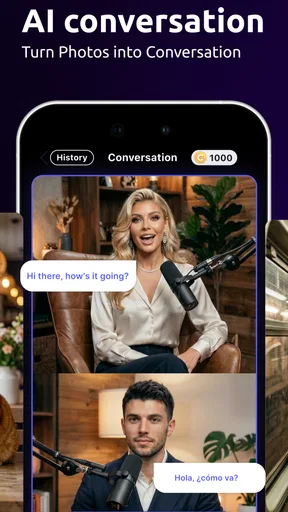
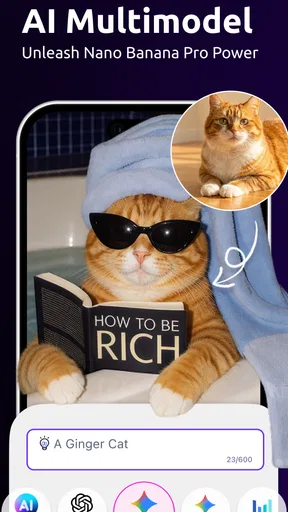

 Analysis by AppCompare
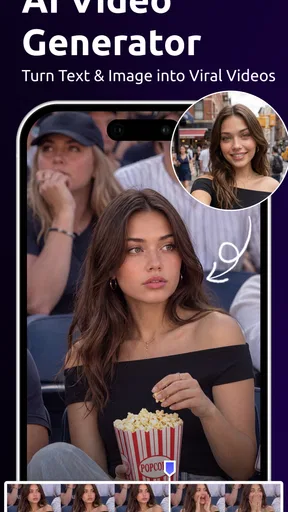
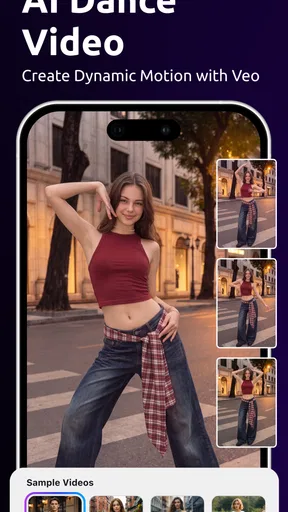
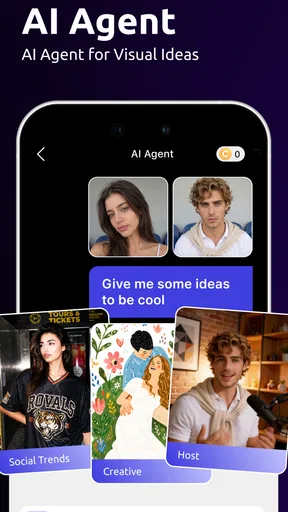
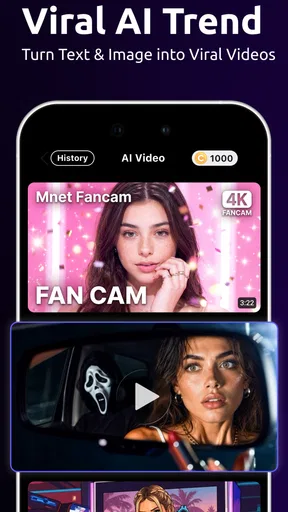
I tend to reach for YouCam AI Pro: AI Image & Video when I want to turn an idea or an ordinary shot into something more polished without building an edit from scratch. Its appeal is the mix of AI image and video creation with familiar editing tools, all in an app from Perfect Mobile Corp. That blend is useful for quick creative experiments, but it also means the experience depends on having a clear goal and a reliable connection when you’re asking the app to generate something.
When a creative request depends on the network
AI creation is the part that makes this different from a basic photo editor. I’d use it to explore a visual direction, make a playful image for a group chat, or create a short video concept from a written prompt. It is better approached as a way to produce ideas and starting points than as a guaranteed shortcut to a precise, finished result: a prompt can leave room for interpretation, so I’d expect to adjust the wording and try alternatives when the first result misses the mark.
That process makes connectivity part of the creative workflow. A request has to be sent and the generated result has to come back, so a weak or interrupted connection can make the wait feel more noticeable than it would while applying a simple filter. When I’m planning to create something for a specific moment, I’d do the generation before I need to share it rather than leaving it until the last minute.
First Impressions and Features
When you first launch YouCam AI Pro, you’re greeted with a sleek and intuitive interface. The design feels modern and user-friendly, making it easy for anyone to navigate. I’ve tried quite a few editing apps, and I must say, the simplicity here is a breath of fresh air.
One of the standout features is the AI-powered image enhancement. This isn’t just your regular brightness and contrast adjustments; we’re talking about sophisticated algorithms that intelligently enhance your photos. Whether it's improving lighting, sharpening details, or even removing unwanted objects, the AI seems to work its magic effortlessly.
For video enthusiasts, the app offers some pretty neat tools as well. You can apply filters, adjust speed, and even add music to your clips. What impressed me the most is the app’s ability to stabilize shaky footage. It’s like having a mini production studio right in your pocket!
Making a small project work on a phone
A realistic use for me would be preparing a quick birthday message: I could start with a photo, test an AI-generated look, then make a short clip feel more lively with a filter or music. The helpful trick is to decide what the finished piece needs before opening every tool. If the photo already has a strong subject, I’d avoid stacking several dramatic effects; one clear treatment usually keeps the person or moment recognizable.
Worth Reading Before You Choose

EA SPORTS FC Mobile 26 Is a Bigger Football Game, but It Takes Time

Flipboard Shows What News Apps Must Do Beyond the Feed

Switching to Android Auto Means Rethinking Your Driving Routine

Google Calendar Makes a Crowded Week Easier to Manage

Ludo King Makes the Most of the Minutes Between Plans

Baby Panda World Brings Quick Play to Modern Phones, but Its Game Library Feels Busy
For a shop owner or someone posting casually, the app can help make a simple image or clip feel considered without requiring a desktop editing session. I’d still check the result at full size before sharing. AI enhancement can make details look different from the original, and a visual that seems striking on a small phone screen may not suit a product image where accurate color and texture matter.
Fun with Filters and Effects
If you’re into filters and effects, you’re in for a treat. The app offers a wide variety of real-time filters, ranging from subtle enhancements to dramatic transformations. Whether you’re into vintage vibes or futuristic looks, there’s something for every mood. I found myself spending quite a bit of time just experimenting with different styles.
Another cool feature is the ability to create animated effects. You can easily add moving elements to your photos or videos, making them pop with life and creativity. It’s a feature that brings a bit of whimsy to your edits and can make your content stand out on social media.
Choosing it over a conventional editor
Compared with a traditional photo editor, the attraction here is speed and the chance to try an idea through AI rather than manually shaping every adjustment. A conventional editor is still the better choice when I need exact control over layers, color, or a carefully repeatable look. Likewise, a dedicated video editor is likely to suit a longer project with a detailed timeline better than a phone-first tool built for quick creative work.
I see this app as a companion for experimentation, not a replacement for every specialist tool. One useful workflow is to generate or enhance a candidate, then compare it with the untouched original before committing to the edit. That simple check helps avoid mistaking a more dramatic image for a more accurate one, especially when the goal is to preserve a real memory rather than make an eye-catching post.
Ease of Use and Accessibility
One of the things I appreciate about YouCam AI Pro is its accessibility. The app is designed to cater to both beginners and more experienced users. For those who just want quick edits, the one-tap enhancements work wonders. But if you’re like me and enjoy getting into the nitty-gritty, the app offers plenty of advanced tools and options to tinker with.
The app also supports a wide range of file formats, which is a huge plus. Whether you’re working with high-resolution images or large video files, YouCam AI Pro handles them with ease. Plus, exporting your finished masterpiece is a breeze, with options to share directly to your favorite platforms or save to your device.
What to do when a generation stalls
If a generation or upload seems to pause, I’d first check whether the connection is stable and give the request a moment before repeating it. Sending the same prompt several times in a hurry can create uncertainty about which result is the one I meant to keep. For a time-sensitive edit, it’s sensible to save work as I go and leave room to try again, rather than assuming every network-dependent step will finish instantly.
Large original files can also make a mobile workflow feel less convenient, even when the editing tools themselves are straightforward. If I’m working with a long clip or a high-resolution image, I’d choose the exact material I need before starting and avoid treating the app as a place to manage an entire camera roll. A focused project is easier to review and less frustrating if I need to switch networks or return to the task later.
Using it thoughtfully on mobile data
AI generation and video work can involve more than a quick tap, so I’d be mindful of when I’m using mobile data, particularly if I’m away from a dependable connection. I would prepare prompts in advance, keep the source files I actually need close at hand, and save the finished version once I’m happy with it. This is a practical habit rather than a claim about how the app stores or processes files.
For people who create on the move, that planning matters. A short edit between errands is realistic; a series of open-ended generations while rushing to catch a train is less appealing. If connectivity is inconsistent where you work, a conventional editor with tools that suit your usual workflow may be more dependable for a deadline, while this app is more enjoyable when you have time to explore.
Community and Learning
One feature that I found particularly engaging is the app’s community integration. You can connect with other users, share your creations, and even gain inspiration from what others are doing. It’s a great way to learn new techniques and stay motivated to improve your editing skills.
For those who want to dive deeper, the app provides tutorials and tips right within the interface. It’s like having a mentor guiding you through the editing process, which I found incredibly helpful.
Still, inspiration is most useful when it turns into a choice you can explain. When I see an effect I like, I’d pay attention to whether it is the lighting, color, or motion that makes it work, then try applying only that idea to my own image. That keeps a personal edit from becoming a pile of unrelated effects and makes the learning feel practical rather than just a tour of styles.
Who will enjoy it, and where it fits
The app is free to try, with in-app purchases ranging from $1.49 to $119.99 per item, so I’d explore the tools I actually need before deciding whether any paid option is worthwhile. Its average rating is 3.7 from around five thousand ratings, and it has passed half a million installs. It is rated for Everyone, was released on September 3, 2024, and version 1.25.4 requires Android 9 or later.
I’d recommend it to curious beginners, casual creators, and anyone who wants a quick way to test AI-made visuals alongside ordinary photo and video edits. I’d be more cautious if I needed exact, repeatable results, professional control, or a reliable last-minute workflow on an unstable connection. People who mainly want careful manual retouching may be happier with a conventional editor, while someone producing longer videos should compare dedicated video tools before building a routine around this one.
So, is YouCam AI Pro: AI Image & Video worth trying out? In my opinion, absolutely! It’s a versatile and powerful tool that simplifies the editing process while offering enough depth for those who want to explore further. Whether you’re looking to enhance your personal photos or create eye-catching content for your business, this app has got you covered.
With its intuitive design, robust features, and active community, YouCam AI Pro stands out as a must-have app for anyone interested in photography and videography. Give it a shot, and who knows? You might just find yourself hooked on the endless creative possibilities it offers.
My practical verdict is a little more specific: I’d keep it in mind for playful experiments, quick social posts, and small edits where convenience matters more than exact control. I would not make it my only tool for an important, deadline-driven project, especially if I couldn’t count on a good connection. Start with one photo or short clip, test how its AI style fits your taste, and then decide whether its mix of creation and editing earns a regular place on your phone.
Pros
- Impressive AI-powered photo enhancements.
- User-friendly interface with intuitive controls.
- Wide range of filters and effects available.
- Fast processing time for edits and exports.
- Supports both images and videos seamlessly.
Cons
- In-app purchases can be pricey.
- Requires strong internet for optimal performance.
- Occasional crashes on older devices.
- Limited features in the free version.
- High battery consumption during use.
FAQs for YouCam AI Pro: AI Image &Video
What features does YouCam AI Pro offer for image and video editing?
YouCam AI Pro provides a wide range of features for both image and video editing. Users can apply AI-driven filters, enhance photos with beauty tools, and create stunning visual effects. It also offers background removal, retouching options, and a variety of templates for videos, making it a versatile app for creative projects.
Is YouCam AI Pro user-friendly for beginners?
Yes, YouCam AI Pro is designed to be user-friendly, even for beginners. The app features an intuitive interface with easy-to-follow tutorials and guides. Users can quickly learn to navigate the various tools and features, making it accessible for those new to image and video editing.
Does YouCam AI Pro require an internet connection to function?
While some features of YouCam AI Pro may require an internet connection, such as downloading new filters or templates, the core editing functionalities can be used offline. This allows users to work on their projects anytime and anywhere, without being dependent on internet availability.
Are there any in-app purchases in YouCam AI Pro?
Yes, YouCam AI Pro includes in-app purchases. While the app offers a free version with basic features, additional tools, filters, and premium templates can be unlocked through purchases or a subscription. This allows users to expand their creative possibilities according to their needs.
How does YouCam AI Pro ensure user privacy and data security?
YouCam AI Pro prioritizes user privacy and data security by implementing robust encryption protocols and privacy policies. The app ensures that personal data and edited content are protected. Additionally, it provides users with settings to control how their data is used and shared, fostering a secure editing environment.


